Additional Training Resources
How to Create Your Own Custom FSM
This FSM was created by compiling a number of different public available sources. However if you'd like to
create your own FSM with any Toyota, Lexus, or Scion model, you can download the
TIS Clone tool from Github,
buy a TIS subscription, and get started. Pre-requisites and instructions are posted in the link.
List of all manuals this site includes
** Global **

Repair Manuals, Collision Repair, Electrical Wiring Diagrams, and New Car Features
----------------------------------------------------------------------------------
Toyota 1998 - 2007 Land Cruiser Repair Manual (RM0020E)
Toyota 2007/08 - 2011/09 Land Cruiser Repair Manual (RM0814E - covers RM0810E through RM0814E)
Toyota 2011/09 - 2013/01 Land Cruiser Repair Manual (RM19U0E - covers RM19U0E through RM19U2E)
Toyota 2013/01 - 2014/08 Land Cruiser Repair Manual (RM22W1E - covers RM22W0E and RM22W1E)
Toyota 2014/08 - 2017/08 Land Cruiser Repair Manual (RM2660E)
Lexus 2015/09 - 2017/08 LX450d/LX570 Repair Manual (RM27C0E)
Lexus 2013/01 - 2015/08 LX460/LX570 Repair Manual (RM2450E - covers RM2450E through RM2452E)
Lexus 2012/01 - 2012/12 LX460/LX570 Repair Manual (RM08G5E)
Lexus 2007/08 - 2012/12 LX570 Repair Manual (RM08G4E - covers RM08G0E through RM08G4E)


** USA/North America **

General Repair Guides
---------------------
Toyota 1995-2002 Land Cruiser A340 Automatic Transmission Manual (RM479U)
1996-2004 OBD II (OTH021U)

Collision/Body Repair
---------------------
Toyota 1991-1997 Land Cruiser Collision Repair Manual (BR050)
Toyota 1998-2007 Land Cruiser Collision Repair Manual (BRM080U)
Toyota 2008-2016 Land Cruiser Collision Repair Manual (BM0800U)
Toyota 2016-2021 Land Cruiser Collision Repair Manual (BM27J0U)
Lexus 1996-1997 LX450 Collision Repair Manual (CR16X)
Lexus 1998-2007 LX470 Collision Repair Manual (CR02X)
Lexus 2008-2016 LX570 Collision Repair Manual (BM08F0U)
Lexus 2016-2021 LX570 Collision Repair Manual (BM27B0U)

Electrical Wiring Diagrams
--------------------------
Toyota 1991 Land Cruiser Electrical Wiring Diagram (WD085U)
Toyota 1992 Land Cruiser Electrical Wiring Diagram (WD129U)
Toyota 1993 Land Cruiser Electrical Wiring Diagram (WD166U)
Toyota 1994 Land Cruiser Electrical Wiring Diagram (WD189U)
Toyota 1995 Land Cruiser Electrical Wiring Diagram (WD230U)
Toyota 1996 Land Cruiser Electrical Wiring Diagram (WD245U)
Toyota 1997 Land Cruiser Electrical Wiring Diagram (EWD282U)
Toyota 1998 Land Cruiser Electrical Wiring Diagram (EWD339U)
Toyota 1999 Land Cruiser Electrical Wiring Diagram (EWD353U)
Toyota 2000 Land Cruiser Electrical Wiring Diagram (EWD381U)
Toyota 2001 Land Cruiser Electrical Wiring Diagram (EWD426U)
Toyota 2002 Land Cruiser Electrical Wiring Diagram (EWD469U)
Toyota 2003 Land Cruiser Electrical Wiring Diagram (EWD510U)
Toyota 2004 Land Cruiser Electrical Wiring Diagram (EWD548U)
Toyota 2005 Land Cruiser Electrical Wiring Diagram (EWD601U)
Toyota 2006 Land Cruiser Electrical Wiring Diagram (EM0010U)
Toyota 2007 Land Cruiser Electrical Wiring Diagram (EM03R0U)
Toyota 2008 Land Cruiser Electrical Wiring Diagram (EM0800U)
Toyota 2009 Land Cruiser Electrical Wiring Diagram (EM10V0U)
Toyota 2010 Land Cruiser Electrical Wiring Diagram (EM13N0U)
Toyota 2011 Land Cruiser Electrical Wiring Diagram (EM16F0U)
Toyota 2013 Land Cruiser Electrical Wiring Diagram (EM18X0U)
Toyota 2014 Land Cruiser Electrical Wiring Diagram (EM23T0U)
Toyota 2015 Land Cruiser Electrical Wiring Diagram (EM2650U)
Toyota 2016-2021 Land Cruiser Electrical Wiring Diagram (EM27J0U)
Lexus 1996 LX450 Electrical Wiring Diagram (EWD270U)
Lexus 1997 LX450 Electrical Wiring Diagram (EWD299U)
Lexus 1998 LX470 Electrical Wiring Diagram (EWD338U)
Lexus 1999 LX470 Electrical Wiring Diagram (EWD354U)
Lexus 2000 LX470 Electrical Wiring Diagram (EWD382U)
Lexus 2001 LX470 Electrical Wiring Diagram (EWD427U)
Lexus 2002 LX470 Electrical Wiring Diagram (EWD455U)
Lexus 2003 LX470 Electrical Wiring Diagram (EWD508U)
Lexus 2004 LX470 Electrical Wiring Diagram (EWD546U)
Lexus 2005 LX470 Electrical Wiring Diagram (EWD603U)
Lexus 2006 LX470 Electrical Wiring Diagram (EM0030U)
Lexus 2007 LX470 Electrical Wiring Diagram (EM03E0U)
Lexus 2008 LX570 Electrical Wiring Diagram (EM08F0U)
Lexus 2009 LX570 Electrical Wiring Diagram (EM10N0U)
Lexus 2010 LX570 Electrical Wiring Diagram (EM14H0U)
Lexus 2011 LX570 Electrical Wiring Diagram (EM1690U)
Lexus 2013 LX570 Electrical Wiring Diagram (EM19F0U)
Lexus 2014 LX570 Electrical Wiring Diagram (EM2410U)
Lexus 2015 LX570 Electrical Wiring Diagram (EM2670U)
Lexus 2016-2021 LX570 Electrical Wiring Diagram (EM27B0U)

Repair Manuals
--------------
Toyota 1990 Land Cruiser Repair Manual (RM154U)
Toyota 1991 Land Cruiser Repair Manual (RM180U)
Toyota 1992 Land Cruiser Repair Manual (RM258U)
Toyota 1993 Land Cruiser Repair Manual (RM301U)
Toyota 1994 Land Cruiser Repair Manual (RM360U)
Toyota 1995 Land Cruiser Repair Manual (RM432U)
Toyota 1996 Land Cruiser Repair Manual (RM451U)
Toyota 1997 Land Cruiser Repair Manual (RM510U)
Toyota 1998 Land Cruiser Repair Manual (RM615U)
Toyota 1999 Land Cruiser Repair Manual (RM661U)
Toyota 2000 Land Cruiser Repair Manual (RM722U)
Toyota 2001 Land Cruiser Repair Manual (RM795U)
Toyota 2002 Land Cruiser Repair Manual (RM893U)
Toyota 2003 Land Cruiser Repair Manual (RM966U)
Toyota 2004 Land Cruiser Repair Manual (RM1071U)
Toyota 2005 Land Cruiser Repair Manual (RM1147U)
Toyota 2006 Land Cruiser Repair Manual (RM0010U)
Toyota 2007 Land Cruiser Repair Manual (RM03R0U)
Toyota 2008 Land Cruiser Repair Manual (RM0800U)
Toyota 2009 Land Cruiser Repair Manual (RM10V0U)
Toyota 2010 Land Cruiser Repair Manual (RM13N0U)
Toyota 2011 Land Cruiser Repair Manual (RM16F0U)
Toyota 2013 Land Cruiser Repair Manual (RM18X0U)
Toyota 2014 Land Cruiser Repair Manual (RM23T0U)
Toyota 2015 Land Cruiser Repair Manual (RM2650U)
Toyota 2016-2021 Land Cruiser Repair Manual (RM27J0U)
Lexus 1996 LX450 Repair Manual (RM482U)
Lexus 1997 LX450 Repair Manual (RM515U)
Lexus 1998 LX470 Repair Manual (RM620U)
Lexus 1999 LX470 Repair Manual (RM662U)
Lexus 2000 LX470 Repair Manual (RM745U)
Lexus 2001 LX470 Repair Manual (RM802U)
Lexus 2002 LX470 Repair Manual (RM914U)
Lexus 2003 LX470 Repair Manual (RM973U)
Lexus 2004 LX470 Repair Manual (RM1056U)
Lexus 2005 LX470 Repair Manual (RM1134U)
Lexus 2006 LX470 Repair Manual (RM0030U)
Lexus 2007 LX470 Repair Manual (RM03E0U)
Lexus 2008 LX570 Repair Manual (RM08F0U)
Lexus 2009 LX570 Repair Manual (RM10N0U)
Lexus 2010 LX570 Repair Manual (RM14H0U)
Lexus 2011 LX570 Repair Manual (RM1690U)
Lexus 2013 LX570 Repair Manual (RM19F0U)
Lexus 2014 LX570 Repair Manual (RM2410U)
Lexus 2015 LX570 Repair Manual (RM2670U)
Lexus 2016-2021 LX570 Repair Manual (RM27B0U)


New Car Features
----------------
Toyota 1990 Land Cruiser New Car Features (NCF017TX)
Toyota 1991 Land Cruiser New Car Features (NCF010TX)
Toyota 1992 Land Cruiser New Car Features (NCF008TX)
Toyota 1993 Land Cruiser New Car Features (NCO92U)
Toyota 1994 Land Cruiser New Car Features (NCF003TX)
Toyota 1995 Land Cruiser New Car Features (NC109U)
Toyota 1996 Land Cruiser New Car Features (NCF996xU)
Toyota 1997 Land Cruiser New Car Features (NC132U)
Toyota 1998 Land Cruiser New Car Features (NCF156U)
Toyota 1999 Land Cruiser New Car Features (NCF160U)
Toyota 2000 Land Cruiser New Car Features (NCF172U)
Toyota 2001 Land Cruiser New Car Features (NCF197U)
Toyota 2002 Land Cruiser New Car Features (NCF214U)
Toyota 2003 Land Cruiser New Car Features (NCF228U)
Toyota 2004 Land Cruiser New Car Features (NCF257U)
Toyota 2005 Land Cruiser New Car Features (NCF275U)
Toyota 2006 Land Cruiser New Car Features (NCF275aUa)
Toyota 2007 Land Cruiser New Car Features (NM03R0U)
Toyota 2008-2009 Land Cruiser New Car Features (NM0800U)
Toyota 2010 Land Cruiser New Car Features (NM13N0U)
Toyota 2011 Land Cruiser New Car Features (NM16F0U)
Toyota 2013 Land Cruiser New Car Features (NM18X0U)
Toyota 2014-2015 Land Cruiser New Car Features (NM23T0U)
Toyota 2016-2021 Land Cruiser New Car Features (NM27J0U)
Lexus 1996 LX450 New Car Features (NCF128U)
Lexus 1997 LX450 New Car Features (NCF133U)
Lexus 1998 LX470 New Car Features (NCF155U)
Lexus 1999 LX470 New Car Features (NCF161U)
Lexus 2000 LX470 New Car Features (NCF173U)
Lexus 2001 LX470 New Car Features (NCF192U)
Lexus 2002 LX470 New Car Features (NCF213U)
Lexus 2003 LX470 New Car Features (NCF230U)
Lexus 2004 LX470 New Car Features (NCF259U)
Lexus 2005 LX470 New Car Features (NCF273Ue)
Lexus 2006-2007 LX470 New Car Features (NM0030Uc)
Lexus 2008-2009 LX570 New Car Features (NM08F0U)
Lexus 2010 LX570 New Car Features (NM14H0U)
Lexus 2011 LX570 New Car Features (NM1690U)
Lexus 2013 LX570 New Car Features (NM19F0U)
Lexus 2014 LX570 New Car Features (NM2410U)
Lexus 2015 LX570 New Car Features (NM2670U)
Lexus 2016-2021 LX570 New Car Features (NM27B0U)
Simple Abyss webserver setup
This is one of the easiest and most effective ways to be able to view the documents you downloaded.
- Download the FSM data. If you create an ISO during the process, you'll need to right click and "mount" the ISO as a disk drive.
- Download the Abyss web server from Aprelium. There are Windows, Mac, and Linux versions so this should work for Mac users too.
- Run the installer.
- You can select the defaults
- When it's done you'll get a message saying "Setup has completed. Abyss Web Server service was successfully restarted". However the service may or may not have actually started.
- Go to your start menu and run the "Abyss Web Server Startup Configuration".
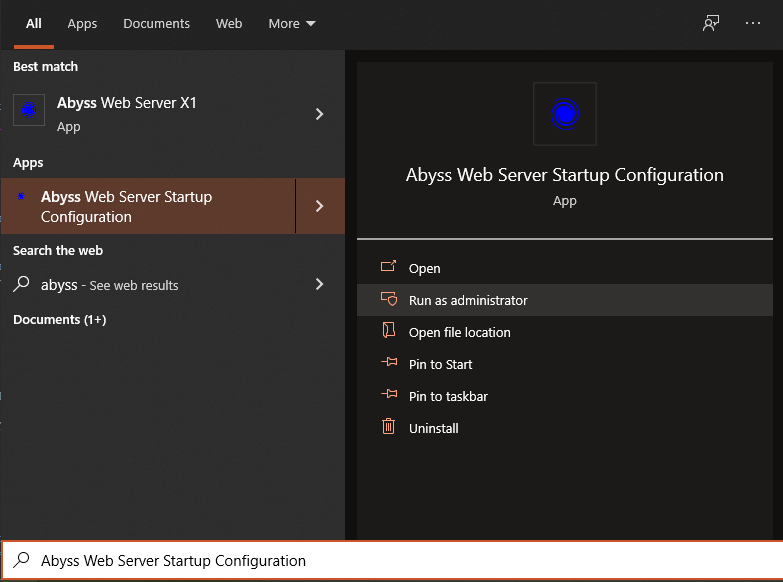
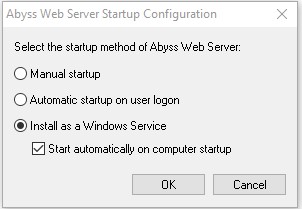
- Change the startup method to "Install as a Windows Service" and leave "Start automatically on computer startup" selected. You'll get a confirmation which says "Abyss Web Server service is installed".
- You will now configure the web server settings
- Go back to the start menu and select "Abyss Web Server X1". This will launch the configuration console in your web browser at http://127.0.0.1:9999/. You'll use the credentials you just created to log in.
- Select English
- Create an administrative name and password to manage the configuration (admin/admin or admin/password is probably fine for this).
- After clicking "OK" you'll be prompted to log in with the username and password you just set up.
- Under the "Hosts" section click the "Configure" button
- Click the "General" link/icon (first one)
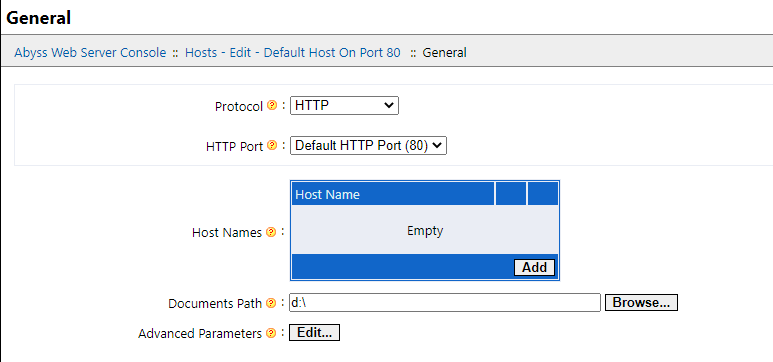
- Set your "Documents Path" to wherever you saved the FSM data to in step #1, then click "OK" in the bottom right corner. I used my whole D:\ here because I have my whole FSM packaged as an ISO file, but you might have saved your download to C:\FSM-Download\ for instance. If you do create an ISO using the make-iso.sh script, you will need to right-click and "mount" it before proceeding.
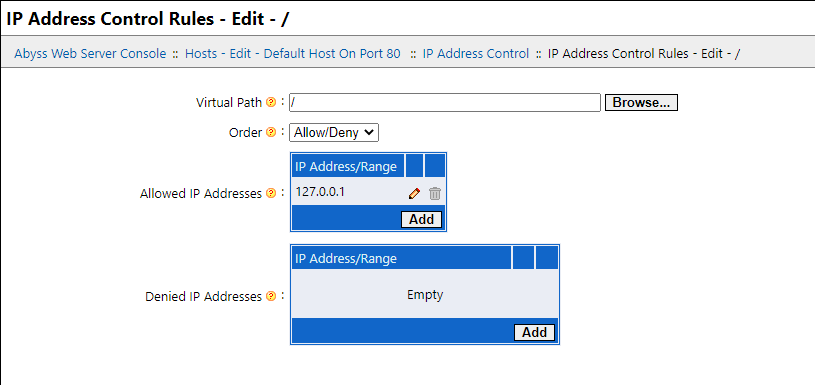
- If you want to prevent anyone else from trying to use your PC (recommended), click the "Default Host On Port 80" navigation link and then select the "IP Address Control Rules" link/icon next and then add an "Allowed IP Address" of "127.0.0.1" and click "OK". Next set the "Virtual Path" to "/". Then click "OK" in the bottom right corner. (Note: I recommend doing this since I cannot vouch for the security of the Abyss web server or the Toyota TIS website code). IP Restrictions
- Click the "Abyss Web Server Console" link near the top to take you back to the "home page" for the configuration menus
- Click the "Server Configuration" link
- Next select "Mime Types".
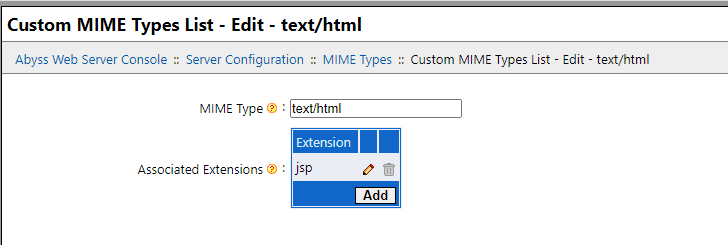
- In the "Custom MIME Types List" at the top, click "add". Create a MIME type of "text/html" and add an associated extension of "jsp". (Note: Setting this is the "magic sauce" which makes Abyss a viable webserver. I tried a few other servers like Fenix but they didn't support adding a JSP extension and without this your browser will just try to download the file locally instead of displaying it). Mime Types
- Click "OK". You should have a banner prompting you to click "Restart" to apply your changes. Do so now.
- Give it a few seconds to restart, and then point your browser to "http://127.0.0.1/"
- Browse away!
For those who go the Abyss Web Server route, keep in mind you'll need to restart the webserver each time you reboot if you didn't configure it to start automatically at boot when you installed it as described in step 3, substep 4 above. If you can't get to the administrative configuration interface at
http://127.0.0.1:9999/ then that's likely the issue.
Go to the Windows search and type "Abyss Web Server Startup Configuration". You can change it from "Manual Startup" to "Install as a Windows Service" (my preference) and click OK. Then hit CTRL-ALT-DEL and open Task Manager, go to the "Services" tab, right-click on "AbyssWebServer" and click "Start". From that point forward it should be running and it should start on future reboots for you. If you ever want to disable it just repeat this paragraph but change it to "Manual startup" or unselect the "start at boot" box and you can always start it by hand in the task manager services tab.
Download the Techstream software from
TIS v13.00.022 (32/64bit) and purchase any ELM327-compatible OBD2 reader. Installation instructions are inside the .rar file.